Build AI pipelines visually
A visual canvas where you connect AI models, logic nodes, and publishing channels into workflows that execute automatically. No code, no API keys, no infrastructure.
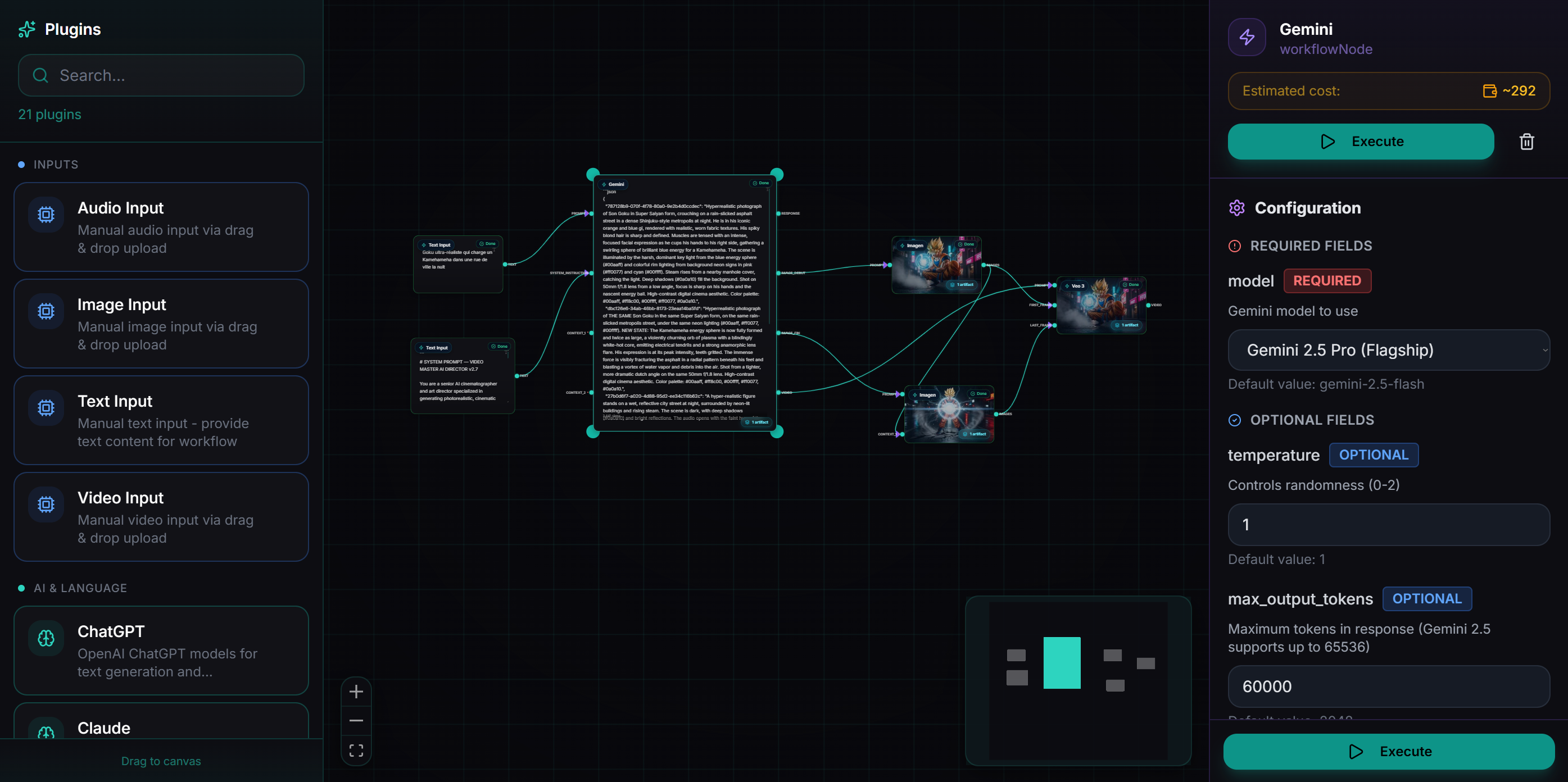
Everything you need to build
Drag & Drop Canvas
Add nodes from the sidebar, position them freely, and connect them with cables. Built on React Flow for buttery-smooth interaction.
Typed Connections
Ports are typed — text, image, video, audio, flexible. Connect only compatible outputs to inputs. The editor prevents invalid connections.
Parallel Branches
Split your workflow into independent branches. Each branch runs in parallel — a text generation and an image generation can happen simultaneously.
One-Click Execution
Hit Execute and watch your pipeline run node by node. WebSocket-powered live updates show progress, artifacts, and errors in real-time.
Live Artifact Preview
Click any completed node to see its output — generated text, images, videos, or audio files. Preview directly in the editor.
Template System
Save your workflow as a template. Publish it to the gallery for others to use, or clone existing templates to customize.
How a workflow runs
1. You click "Execute"
2. Zephly validates the DAG (no cycles, all ports connected)
3. Checks your credit balance
4. Creates a WorkflowRun record
5. Topological sort → determines execution order
6. For each level:
   → Run all independent nodes in PARALLEL (max 5)
   → Pass outputs to downstream node inputs
   → Emit WebSocket events (live UI updates)
7. Store all artifacts (text, images, videos, audio)
8. Mark workflow as complete
9. You see results instantly on each node
Built for power users
DAG Validation
Automatic cycle detection prevents infinite loops. The editor validates your graph structure before execution.
Node Configuration
Each node has a config panel — set model, temperature, aspect ratio, voice, and more without leaving the canvas.
Keyboard Shortcuts
Delete, undo, redo, select all, zoom fit. Power users move fast with familiar keyboard shortcuts.
Responsive Layout
3-column grid positioning for clean visual layouts. Input nodes left, AI nodes center, output nodes right.
Execution History
Every run is saved with its artifacts. Go back to any previous execution to compare results.
Credit Estimation
See the estimated credit cost before you execute. No surprises — you know exactly what a run will cost.
Start building workflows now
Free tier includes 500 credits to start. No credit card required.
Get Started Free